写出好的 commit message
详细内容参考Commit message 和 Change log 编写指南
为什么要关注提交信息
- 加快 Reviewing Code 的过程
- 帮助我们写好 release note
- 5年后帮你快速想起来某个分支,tag 或者 commit 增加了什么功能,改变了哪些代码
- 让其他的开发者在运行 git blame 的时候想跪谢
- 总之一个好的提交信息,会帮助你提高项目的整体质量
commit_message_change_log
每次提交,Commit message 都包括三个部分:Header,Body 和 Footer。
<type>(<scope>): <subject>
// 空一行
<body>
// 空一行
<footer>
其中,Header 是必需的,Body 和 Footer 可以省略。 不管是哪一个部分,任何一行都不得超过72个字符(或100个字符)。这是为了避免自动换行影响美观。
Header部分只有一行,包括三个字段:type(必需)、scope(可选)和subject(必需)。
格式:
<type>(<scope>): <subject>
例如: feat(login): 登录相关逻辑
1.type
- type用于说明 commit 的类别,只允许使用下面7个标识。
- feat:新功能(feature)
- fix:修补bug
- docs:文档(documentation)
- style: 格式(不影响代码运行的变动)
- refactor:重构(即不是新增功能,也不是修改bug的代码变动)
- test:增加测试
- chore:构建过程或辅助工具的变动
如果type为feat和fix,则该 commit 将肯定出现在 Change log 之中。其他情况(docs、chore、style、refactor、test)由你决定,要不要放入 Change log,建议是不要。
2. scope
scope用于说明 commit 影响的范围,比如数据层、控制层、视图层等等,视项目不同而不同。
3. subject
- subject是 commit 目的的简短描述,不超过50个字符。中英文都行
- 以动词开头,使用第一人称现在时,比如change,而不是changed或changes
- 第一个字母小写
- 结尾不加句号(.)
2.2 Body
Body 部分是对本次 commit 的详细描述,可以分成多行。下面是一个范例。
More detailed explanatory text, if necessary.  Wrap it to
about 72 characters or so.

Further paragraphs come after blank lines.

- Bullet points are okay, too
- Use a hanging indent
有两个注意点。
- 使用第一人称现在时,比如使用change而不是changed或changes。
- 应该说明代码变动的动机,以及与以前行为的对比。
2.3 Footer
Footer 部分只用于两种情况。
1. 不兼容变动
如果当前代码与上一个版本不兼容,则 Footer 部分以BREAKING CHANGE开头,后面是对变动的描述、以及变动理由和迁移方法。
BREAKING CHANGE: isolate scope bindings definition has changed.

    To migrate the code follow the example below:

    Before:

    scope: {
      myAttr: 'attribute',
    }

    After:

    scope: {
      myAttr: '@',
    }

    The removed `inject` wasn't generaly useful for directives so there should be no code using it.
2. 关闭 Issue
如果当前 commit 针对某个issue,那么可以在 Footer 部分关闭这个 issue 。
Closes #234
也可以一次关闭多个 issue 。
Closes #123, #245, #992
2.4 Revert
还有一种特殊情况,如果当前 commit 用于撤销以前的 commit,则必须以revert:开头,后面跟着被撤销 Commit 的 Header。
revert: feat(pencil): add 'graphiteWidth' option
This reverts commit 667ecc1654a317a13331b17617d973392f415f02.
Body部分的格式是固定的,必须写成This reverts commit <hash>.,其中的hash是被撤销 commit 的 SHA 标识符。 如果当前 commit 与被撤销的 commit,在同一个发布(release)里面,那么它们都不会出现在 Change log 里面。如果两者在不同的发布,那么当前 commit,会出现在 Change log 的Reverts小标题下面。
规范如何使用,如何逼迫自己必须遵守呢
现在规范是有了,但是还需要一个工具自动帮我们检测我们编写的 commit message 是否真的符合规范。这就好比是我们创建了一套 JavaScript 的语法规范,还需要 ESLint 这样的功能来自动帮我们检查一样。
对于 commit message 来说,这个工具就是 commitlint。
在项目中启用 commitlint
和 ESLint 一样的是,commitlint 自身只提供了检测的功能和一些最基础的规则。使用者需要根据这些规则配置出自己的规范。
对于 Conventional Commits 规范,社区已经整理好了 @commitlint/config-conventional 包,我们只需要安装并启用它就可以了。
首先安装 commitlint 以及 conventional 规范:
npm install --save-dev @commitlint/cli @commitlint/config-conventional
接着创建 commitlint.config.js 文件,并写入以下内容:
module.exports = {
  extends: ['@commitlint/config-conventional'],
};
至此,commitlint 的配置就基本完成了。但目前我们还没有说何时来执行 commitlint。
答案显而易见,在每次执行 git commit 的时候咯~
为了可以在每次 commit 时执行 commitlint 检查我们输入的 message,我们还需要用到一个工具 —— husky。
husky 是一个增强的 git hook 工具。可以在 git hook 的各个阶段执行我们在 package.json 中配置好的 npm script。
首先安装 husky:
npm install --save-dev husky
接着在 package.json 中配置 commitmsg 脚本:
{
  "scripts": {
    "commitmsg": "commitlint -E GIT_PARAMS"
  }
}
至此就彻底配置完成啦。
让我们来感受一下:https://img12.360buyimg.com/uba/jfs/t21337/289/681073221/88718/eac5bc39/5b15340bN8af4d42f.gif
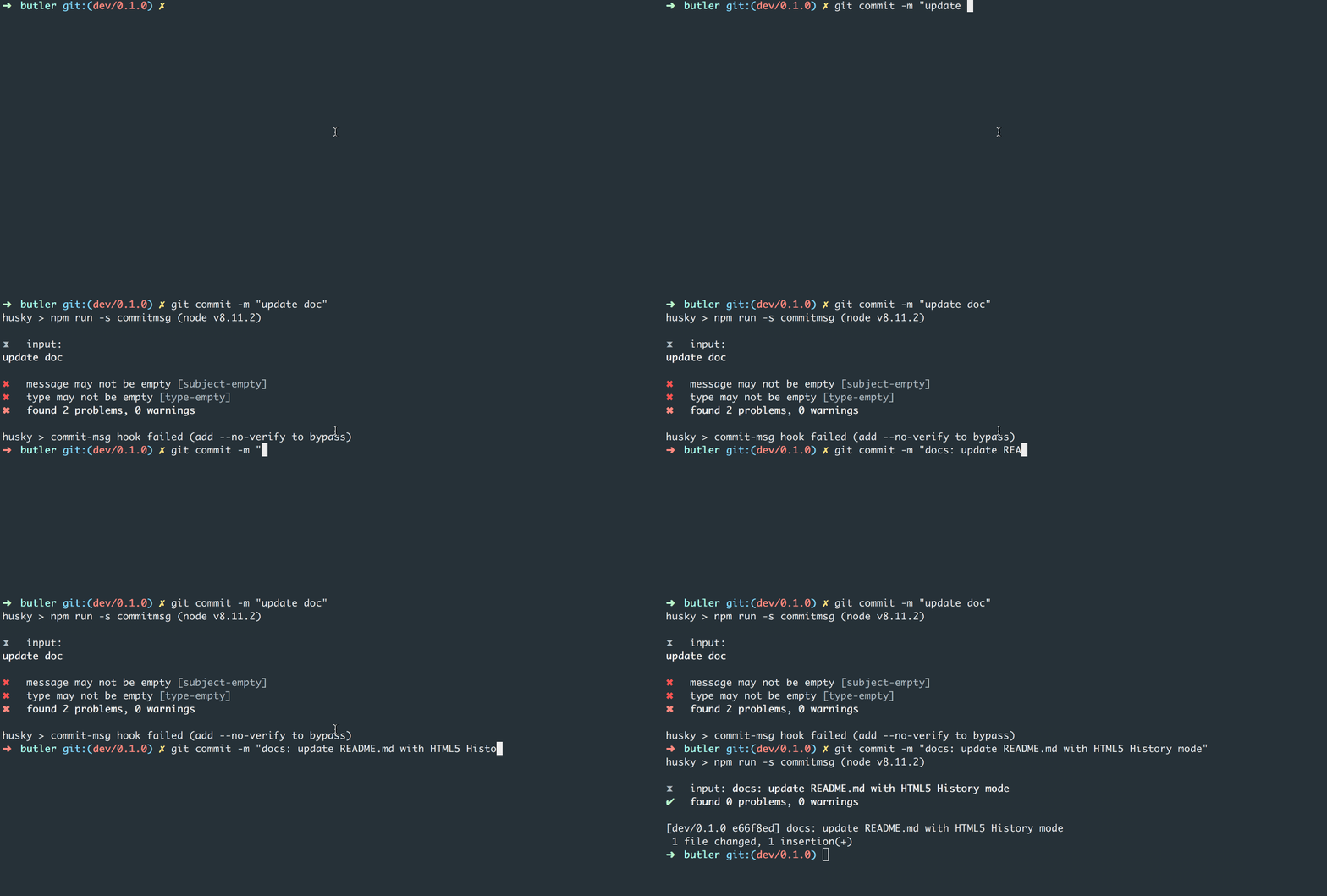
还在等什么?赶快在自己的项目中启用 commitlint 吧!